

What are Popovers?
Popovers are small overlays with custom content that appear when mousing over an icon. If you see the Popover icon in content, simply hover your mouse over it to see additional information.

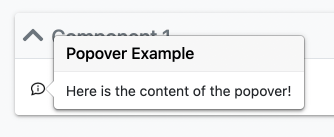
Popovers enable Editors to add small additions to their content that are only viewed when needed, keeping important information front and center, and secondary information quickly accessible.
Creating and Managing Popovers
Before Popovers can be added to content, they need to be created in the Popover Manager, found under Administration > Content > Popovers. This menu can be accessed by any user with the Edit Pages right.


The Popover Manager shows a list of all Popovers in the Site. Using the Edit and Delete buttons, any Popover can be edited or deleted respectively.
To create a new Popover…
- Click the Add Popover button to enter the Popover Editor.
- Enter the Display Name that will appear as the Popover’s title in the page.
- Enter the Internal Name that will appear in the Content Editor when inserting a Popover.
- Check the Enabled in pages box to allow the Popover to be inserted in pages.
- Create your Popover Content. Note that CSS styles cannot be used to style the content.
- Click Save to finish creating your content.
Inserting Popovers into Content
Popovers are inserted into content with the Insert Popovers dropdown. Simply select the Popover to be inserted from the list.

